Dlc
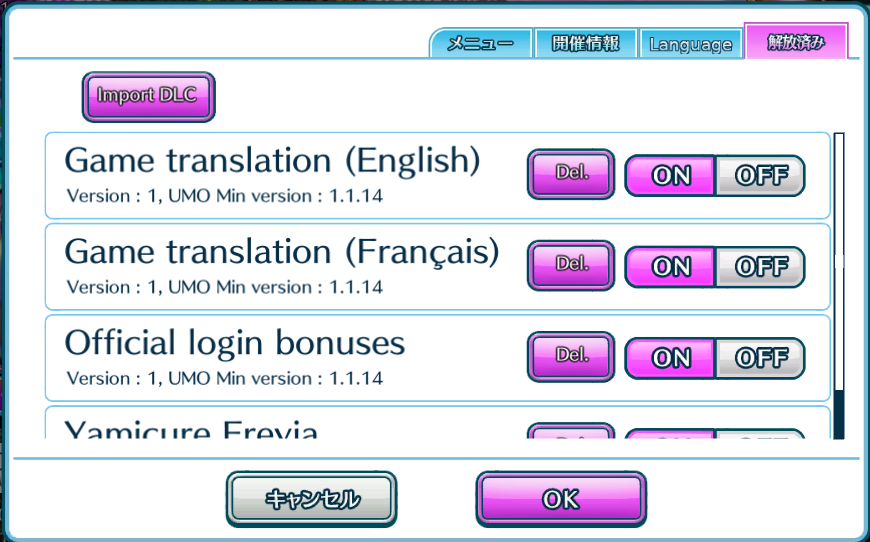
UMO added a DLC system to allow to easily add new content in the game. You can manage them in the 4th tab of teh UMO popup.
Import a DLC
Section titled “Import a DLC”- Download the zip file you want to install or update.
- Use the Import DLC button and select the zip file.
- The game will check if the DLC is valid. If a Dlc with the same id is already installed, a confirmation popup will be displayed.
- If the Dlc is installed, it will appear in the list.
- Once the Dlc installed, you can delete the original zip file.
The current available DLC are :
- Language
- Login bonuses
- Official (08/2017 > 08/2018) : http://umo.xele.org:8000/offcial-login-bonuses_1_Android.zip
Uninstall a DLC
Section titled “Uninstall a DLC”Use the Del. Button on a Dlc line to remove a DLC.
Enable/Disable a DLC
Section titled “Enable/Disable a DLC”You can enable/disable a dlc without having to delete and reinstall it. Use the ON/OFF switch to set if the DLC is enabled.